> ## Documentation Index
> Fetch the complete documentation index at: https://docs.linkup.so/llms.txt
> Use this file to discover all available pages before exploring further.
# Company Intelligence Engine
> Build a real-time company research system using the Linkup API.
In this tutorial, you'll learn how to build a real-time company intelligence system that automatically gathers and structures information about any company. This system is perfect for sales teams, market researchers, and anyone needing up-to-date company information.
## Prerequisites
Before starting, ensure you have:
* Python 3.7 or newer installed
* Basic familiarity with Python programming
* A Linkup API key (required for making requests)
Create a Linkup account for free to get your API key.
## Project setup
Let's start by creating a new project and installing the necessary dependencies:
```shell shell theme={"system"}
# Create a new project directory
mkdir company-intel
cd company-intel
# Install required packages
pip install linkup-sdk pydantic fastapi uvicorn
```
## Implementation guide
### 1. Define your data structure
First, we'll create a data model that specifies exactly what company information we want to collect. Create a new file called `schema.py`:
```python python theme={"system"}
from pydantic import BaseModel
from typing import List, Optional
class CompanyInfo(BaseModel):
# Basic company information
name: str = "" # Company name
website: str = "" # Official website URL
description: str = "" # Brief company description
# Detailed information
latest_funding: str = "" # Most recent funding information
recent_news: List[str] = [] # Latest company news
leadership_team: List[str] = [] # Key executives and leaders
tech_stack: List[str] = [] # Technologies used by the company
```
This schema ensures our data is consistently structured and validated.
### 2. Build the intelligence engine
Next, create `company_intel.py` to handle the core functionality:
```python python theme={"system"}
from linkup import LinkupClient
from schema import CompanyInfo
class CompanyIntelligence:
def __init__(self, api_key: str):
"""Initialize the intelligence engine with your API key."""
self.client = LinkupClient(api_key=api_key)
def research_company(self, company_name: str) -> CompanyInfo:
"""
Gather comprehensive information about a company.
Args:
company_name (str): Name of the company to research
Returns:
CompanyInfo: Structured company information
"""
query = f"""
Research {company_name} and provide:
- Company name, website, and brief description
- Most recent funding round or financial announcement
- Current leadership team members
- Technologies and tools they use
- Recent news from the last 3 months
Focus on current, verified information.
"""
# Make the API request with structured output
response = self.client.search(
query=query,
depth="deep", # Get comprehensive results
output_type="structured",
structured_output_schema=CompanyInfo
)
return response
```
### 3. Create the API layer
Now let's make our intelligence engine accessible via HTTP. Create `api.py`:
```python python theme={"system"}
from fastapi import FastAPI, HTTPException
from company_intel import CompanyIntelligence
# Initialize FastAPI with metadata
app = FastAPI(
title="Company Intelligence API",
description="Real-time company research and intelligence",
version="1.0.0"
)
# Create intelligence engine instance
intel = CompanyIntelligence(api_key="your-linkup-api-key")
@app.get("/company/{name}", tags=["Company Research"])
async def get_company_info(name: str):
"""
Retrieve detailed information about a company.
Parameters:
name (str): Company name to research
Returns:
CompanyInfo: Structured company information
"""
try:
return intel.research_company(name)
except Exception as e:
raise HTTPException(
status_code=500,
detail=f"Error researching company: {str(e)}"
)
```
## Using the system
### Basic usage example
At first, let's use the intelligence engine directly in Python. We will create a new file called `main.py` and add the following code to it:
```python python theme={"system"}
from company_intel import CompanyIntelligence
# Initialize the intelligence engine
intel = CompanyIntelligence(api_key="your-api-key")
# Research a company
company = intel.research_company("Vercel")
# Access the information
print(f"Company: {company.name}")
print(f"Website: {company.website}")
print(f"Description: {company.description}")
print(f"Latest Funding: {company.latest_funding}")
print(f"Recent News: {', '.join(company.recent_news)}")
print(f"Leadership Team: {', '.join(company.leadership_team)}")
print(f"Technologies: {', '.join(company.tech_stack)}")
```
Create a Linkup account for free to get your API key.
You can run the code by executing the following command:
```shell shell theme={"system"}
python main.py
```
### Running the API server
Let's now try our API server.
```shell shell theme={"system"}
# Start the server with auto-reload enabled
uvicorn api:app --reload
```
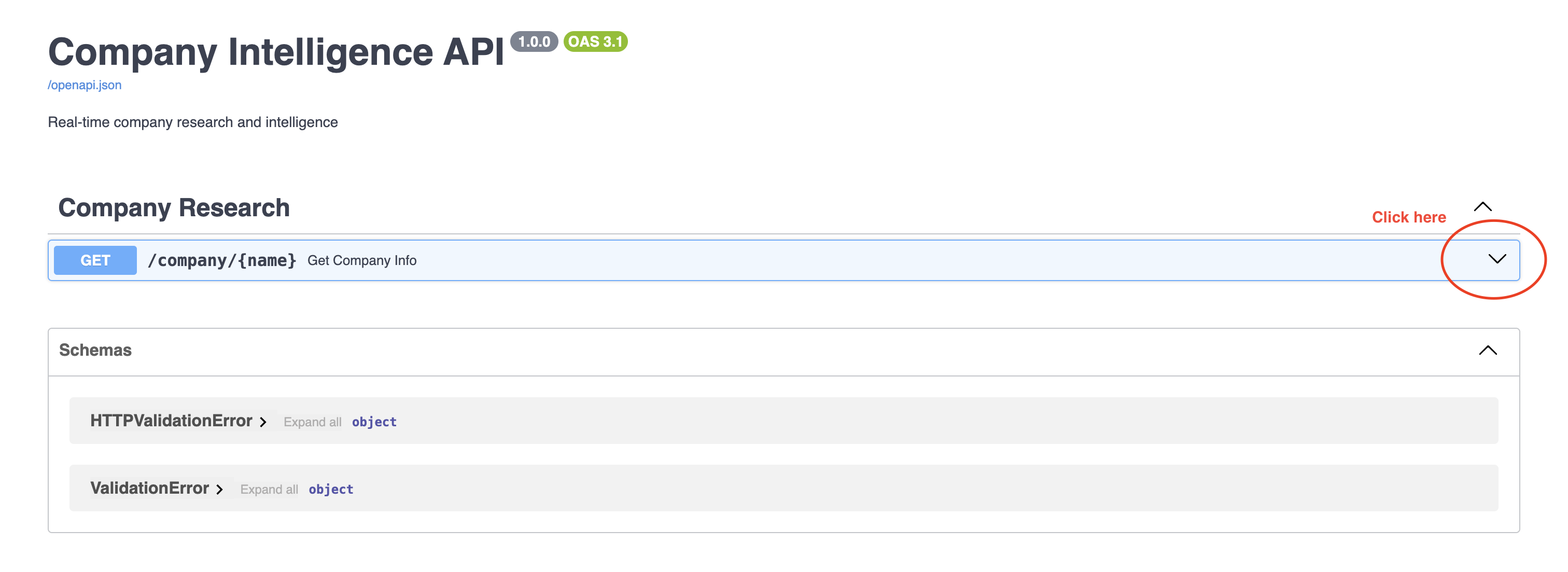
You can now access the API at `http://localhost:8000/docs`.
#### Step 1
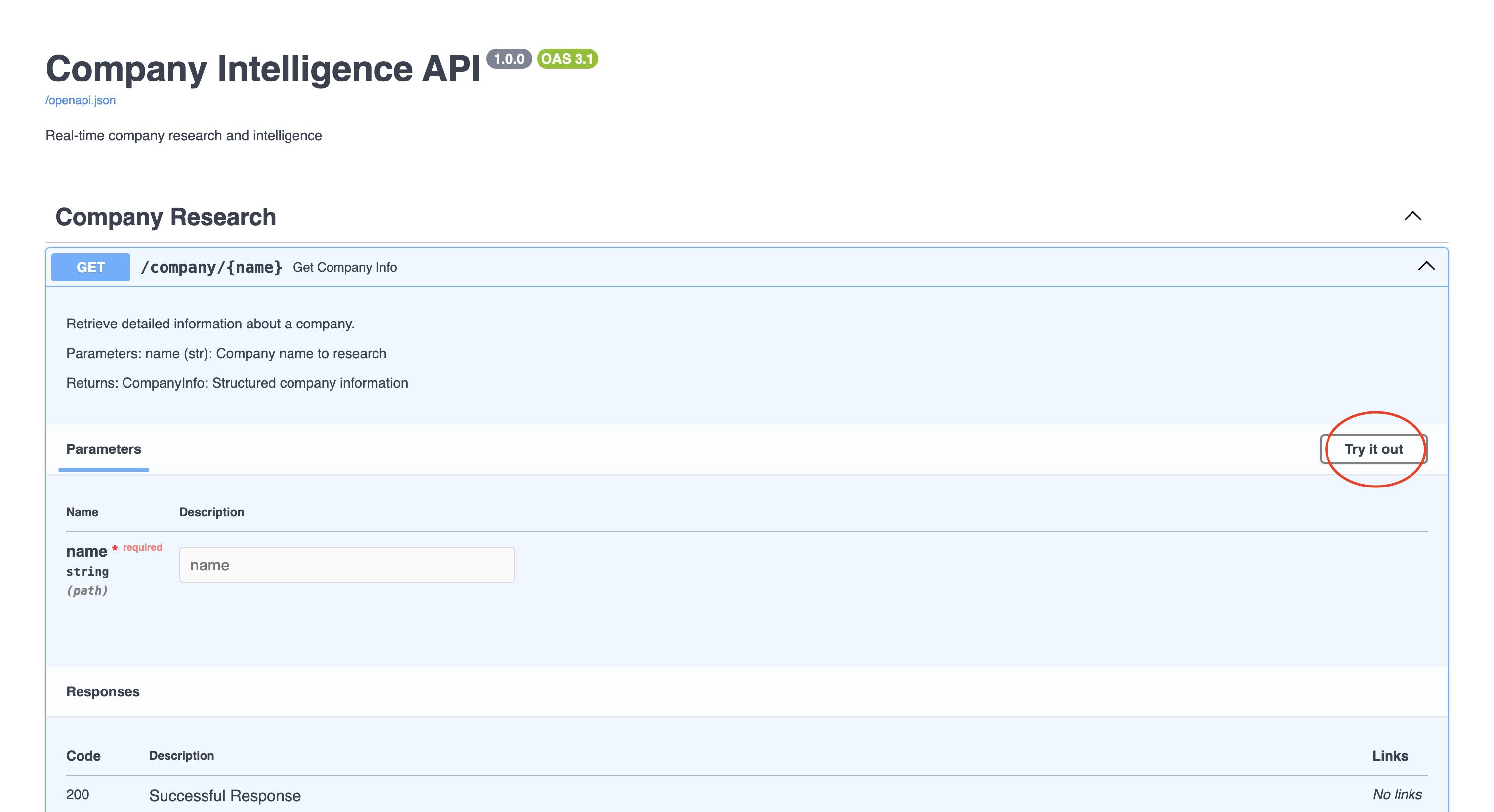
Click on the endpoint `GET /company/{name}`, and click on the `Try it out` button.
 #### Step 2
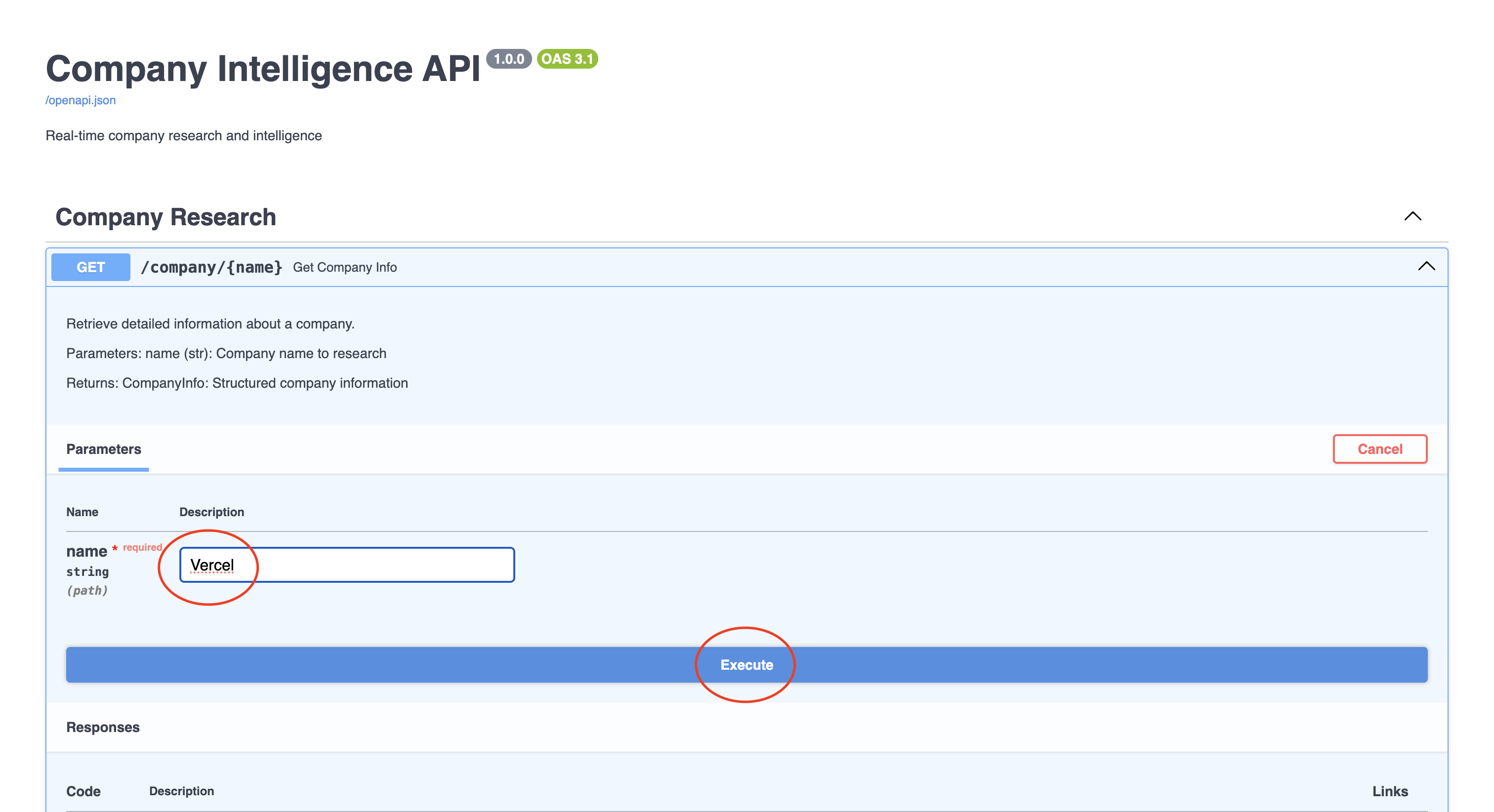
 Now, enter the company name, for example `Vercel`, and click on the `Execute` button.
#### Step 3
Now, enter the company name, for example `Vercel`, and click on the `Execute` button.
#### Step 3
 #### Step 4
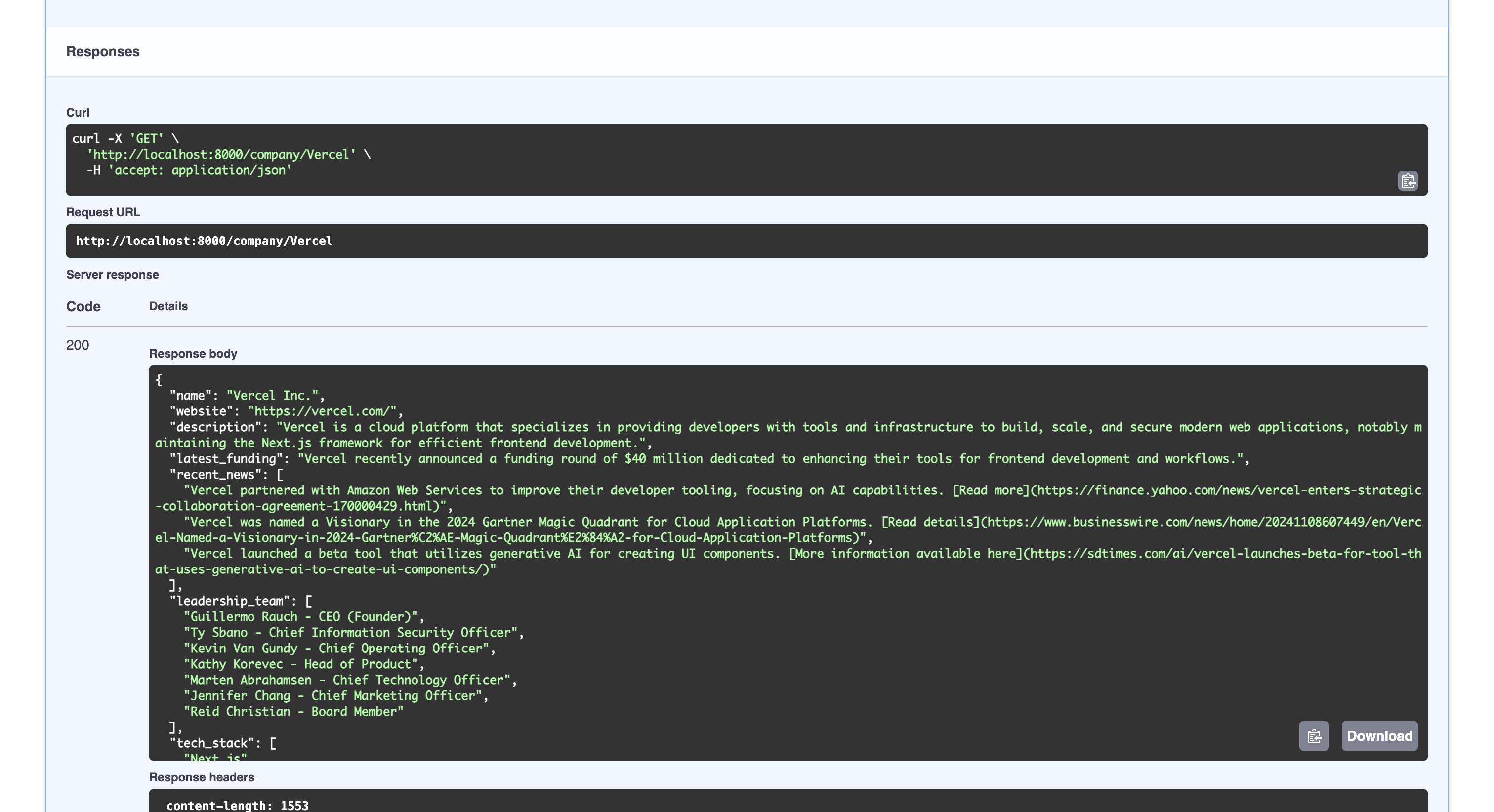
You should see the response in JSON format.
#### Step 4
You should see the response in JSON format.
 ## Response examples
### Successful response
A typical successful request to `/company/Vercel` returns:
```json theme={"system"}
{
"name": "Vercel",
"website": "https://vercel.com",
"description": "Vercel is a cloud platform for static sites and Serverless Functions that fits perfectly with your workflow. It enables developers to host websites and web services that deploy instantly and scale automatically.",
"latest_funding": "Series D - $150M (December 2023)",
"recent_news": [
"Vercel announces Edge Functions improvements with streaming support",
"New Next.js 14 release brings major performance improvements",
"Vercel launches new Enterprise Security features"
],
"leadership_team": [
"Guillermo Rauch - CEO",
"Malte Ubl - CTO"
],
"tech_stack": [
"Next.js",
"React",
"Node.js",
"TypeScript",
"PostgreSQL",
"Redis",
"AWS"
]
}
```
### Error responses
The API returns appropriate error responses in these situations:
#### Company not found
```json theme={"system"}
{
"status_code": 404,
"detail": "Unable to find information for the specified company",
"timestamp": "2024-12-16T10:30:45Z"
}
```
#### Invalid API key
```json theme={"system"}
{
"status_code": 401,
"detail": "Invalid or missing API key",
"timestamp": "2024-12-16T10:30:45Z"
}
```
#### Rate limit exceeded
```json theme={"system"}
{
"status_code": 429,
"detail": "Rate limit exceeded. Please try again in 60 seconds",
"timestamp": "2024-12-16T10:30:45Z"
}
```
## Engine response fields
| Field | Type | Description | Example |
| ---------------- | ------ | ------------------------------- | --------------------------------------------- |
| name | string | Company name | "Vercel" |
| website | string | Company website URL | "[https://vercel.com](https://vercel.com)" |
| description | string | Brief company description | "Vercel is a cloud platform..." |
| latest\_funding | string | Most recent funding information | "Series D - \$150M (December 2023)" |
| recent\_news | array | List of recent news headlines | \["Vercel announces...", "New Next.js 14..."] |
| leadership\_team | array | List of key leadership members | \["Guillermo Rauch - CEO", ...] |
| tech\_stack | array | List of technologies used | \["Next.js", "React", ...] |
| news\_sentiment | float | Optional sentiment score | 0.8 |
| company\_size | string | Optional size estimation | "Large Enterprise" |
## Best practices
For production use, consider implementing these best practices:
1. **Error handling**
* Implement comprehensive error handling for API calls
* Log errors appropriately
* Provide meaningful error messages to users
2. **Rate limiting**
* Implement rate limiting to avoid API quota issues
* Consider using a queue for batch processing
* Add retry logic for failed requests
3. **Caching**
* Cache frequently requested company data
* Use appropriate TTL values based on data freshness requirements
* Implement cache invalidation strategies
4. **Data validation**
* Validate all input data
* Use Pydantic's validation features
* Implement data cleaning where necessary
## Common applications
This system can be used for:
* Pre-sales research automation
* CRM data enrichment
* Competitor monitoring
* Market intelligence gathering
* Investment research
* Due diligence automation
## Conclusion
You now have a company intelligence engine that provides:
* Real-time company information
* Structured, consistent data
* Easy API access
* Extensible architecture
Remember to:
* Keep your API key secure
* Respect API rate limits
* Implement appropriate caching for your use case
* Add error handling for production use
**Need help?** Email `support@linkup.so`, ping us on [Discord](https://discord.com/invite/9q9mCYJa86), or [talk to us](https://calendar.app.google/zNUZz7RxgMMk9pKW7).
## Response examples
### Successful response
A typical successful request to `/company/Vercel` returns:
```json theme={"system"}
{
"name": "Vercel",
"website": "https://vercel.com",
"description": "Vercel is a cloud platform for static sites and Serverless Functions that fits perfectly with your workflow. It enables developers to host websites and web services that deploy instantly and scale automatically.",
"latest_funding": "Series D - $150M (December 2023)",
"recent_news": [
"Vercel announces Edge Functions improvements with streaming support",
"New Next.js 14 release brings major performance improvements",
"Vercel launches new Enterprise Security features"
],
"leadership_team": [
"Guillermo Rauch - CEO",
"Malte Ubl - CTO"
],
"tech_stack": [
"Next.js",
"React",
"Node.js",
"TypeScript",
"PostgreSQL",
"Redis",
"AWS"
]
}
```
### Error responses
The API returns appropriate error responses in these situations:
#### Company not found
```json theme={"system"}
{
"status_code": 404,
"detail": "Unable to find information for the specified company",
"timestamp": "2024-12-16T10:30:45Z"
}
```
#### Invalid API key
```json theme={"system"}
{
"status_code": 401,
"detail": "Invalid or missing API key",
"timestamp": "2024-12-16T10:30:45Z"
}
```
#### Rate limit exceeded
```json theme={"system"}
{
"status_code": 429,
"detail": "Rate limit exceeded. Please try again in 60 seconds",
"timestamp": "2024-12-16T10:30:45Z"
}
```
## Engine response fields
| Field | Type | Description | Example |
| ---------------- | ------ | ------------------------------- | --------------------------------------------- |
| name | string | Company name | "Vercel" |
| website | string | Company website URL | "[https://vercel.com](https://vercel.com)" |
| description | string | Brief company description | "Vercel is a cloud platform..." |
| latest\_funding | string | Most recent funding information | "Series D - \$150M (December 2023)" |
| recent\_news | array | List of recent news headlines | \["Vercel announces...", "New Next.js 14..."] |
| leadership\_team | array | List of key leadership members | \["Guillermo Rauch - CEO", ...] |
| tech\_stack | array | List of technologies used | \["Next.js", "React", ...] |
| news\_sentiment | float | Optional sentiment score | 0.8 |
| company\_size | string | Optional size estimation | "Large Enterprise" |
## Best practices
For production use, consider implementing these best practices:
1. **Error handling**
* Implement comprehensive error handling for API calls
* Log errors appropriately
* Provide meaningful error messages to users
2. **Rate limiting**
* Implement rate limiting to avoid API quota issues
* Consider using a queue for batch processing
* Add retry logic for failed requests
3. **Caching**
* Cache frequently requested company data
* Use appropriate TTL values based on data freshness requirements
* Implement cache invalidation strategies
4. **Data validation**
* Validate all input data
* Use Pydantic's validation features
* Implement data cleaning where necessary
## Common applications
This system can be used for:
* Pre-sales research automation
* CRM data enrichment
* Competitor monitoring
* Market intelligence gathering
* Investment research
* Due diligence automation
## Conclusion
You now have a company intelligence engine that provides:
* Real-time company information
* Structured, consistent data
* Easy API access
* Extensible architecture
Remember to:
* Keep your API key secure
* Respect API rate limits
* Implement appropriate caching for your use case
* Add error handling for production use
**Need help?** Email `support@linkup.so`, ping us on [Discord](https://discord.com/invite/9q9mCYJa86), or [talk to us](https://calendar.app.google/zNUZz7RxgMMk9pKW7).